
モーダル
ボックスリンクをクリックでモーダル表示
| 追加可能パーツ | 変更可能箇所 | 同一ページ に複数設置 |
ページ複製・ クリップボード使用可否 |
|---|---|---|---|
|
■ボックスリンク部分
■モーダル表示部分
|
|
○ | ◯ |
| ※留意事項 | |||
|---|---|---|---|
|
※1:モーダル用のカラムにボタンを置く場合は、そのボタンがモーダルを開くトリガーになります。 |

モーダル01
見出しが入ります。
テキストが入ります。テキストが入ります。テキストが入ります。テキストが入ります。テキストが入ります。テキストが入ります。テキストが入ります。テキストが入ります。テキストが入ります。テキストが入ります。テキストが入ります。テキストが入ります。テキストが入ります。テキストが入ります。テキストが入ります。テキストが入ります。
モーダル02
見出しが入ります。
テキストが入ります。テキストが入ります。テキストが入ります。テキストが入ります。テキストが入ります。テキストが入ります。テキストが入ります。テキストが入ります。テキストが入ります。テキストが入ります。テキストが入ります。テキストが入ります。テキストが入ります。テキストが入ります。テキストが入ります。テキストが入ります。
モーダル03
見出しが入ります。
テキストが入ります。テキストが入ります。テキストが入ります。テキストが入ります。テキストが入ります。テキストが入ります。テキストが入ります。テキストが入ります。テキストが入ります。テキストが入ります。テキストが入ります。テキストが入ります。テキストが入ります。テキストが入ります。テキストが入ります。テキストが入ります。
モーダル04
見出しが入ります。
テキストが入ります。テキストが入ります。テキストが入ります。テキストが入ります。テキストが入ります。テキストが入ります。テキストが入ります。テキストが入ります。テキストが入ります。テキストが入ります。テキストが入ります。テキストが入ります。テキストが入ります。テキストが入ります。テキストが入ります。テキストが入ります。
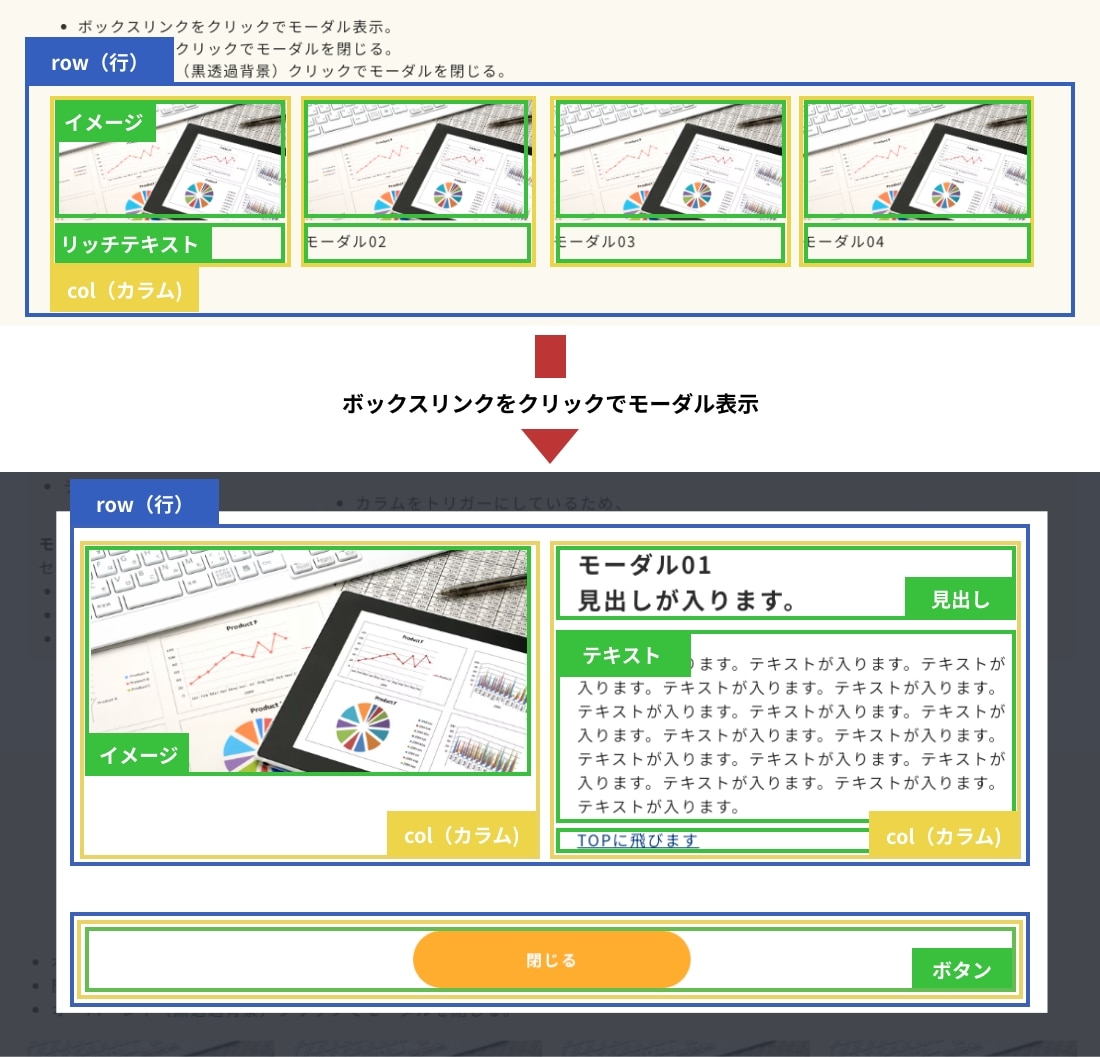
構造図
デモのパーツの構造を説明しています。
設定方法
- CSSをカスタムCSSに記述。
- 編集画面用CSSを適切な位置に記述。
- JavaScriptを使用したいパーツのセクションの一番下に配置。複数ページ設置する場合は共通フッターに配置。
-
クラス名を見本とあわせる。
- ボックスリンクの行(row)に、必要に応じてスタイル調整用のクラス名「modalList_row」を追加。
- ボックスリンクのカラム(col)にクラス名「js-modal_col」を追加。(=モーダル表示のトリガー)
- ボックスリンクのカラム(col)に「リンク設定」またはボタンを設置し、リンク先を[このページの一番上に遷移]に設定。
- ボックスリンクを設置したセクションの直下に新たなセクションを追加し、
クラス名「modal_sec js-modal_sec js-displayNone」の3つを追加。(=モーダル部分)
新CMSの場合:デザインパーツ[セクションパーツ]を使用しても問題ありませんが、背景色は適用されないため注意して下さい。(※ここのセクションの背景色がモーダル表示時の後ろの黒透過背景になる仕様のため、背景カラー①セクションなど使用していても背景色は適用されません。モーダル自体の背景色はカスタムCSSにて、innerに対して設定してください。)
- モーダル用セクションに配置した行(row)に必要に応じてスタイル調整用のクラス名「modal_row」を追加。
- モーダル用セクション内に「ボタンパーツ」を配置し、クラス名「js-modalClose_btn」を追加。(=モーダル閉じるボタン)
旧CMSの場合:必要に応じて、クラス名「btn_custom01」等を追加。
- 新CMSの場合:基本デザインパーツ(セクションパーツ、複合パーツ、単体パーツ)を使用して問題ありません。
iframeで動画を埋め込む場合
- iframeのコードにあるsrcの末尾に「?enablejsapi=1」を追記してください。
- モーダルを閉じた時に動画を停止させるために必要です。
- 引き継ぎに上記の内容を記載してください。
注意点
- ボックスリンクの並び順とセクションの配置順が連動しているので、必ず順番を合わせるように配置してください。
- モーダルセクションの間にモーダルセクション以外の要素を配置しないでください。
- モーダル自体の背景色(innerの背景色)はカスタムCSSで変更してください。
※セクションに背景色をつけても、黒透過背景が上書きされます。 - JSのv1.0.0とv1.0.1を同ページには使用できません。
JS・CSS・編集画面用CSS
- JS
- CSS
- 編集画面用CSS
2025-12-1更新(v1.0.2)
<script>
/* -----------------
モーダル v1.0.2
----------------- */
document.addEventListener('DOMContentLoaded', function() {
/*------------- 変数定義 【変更可能】 START -------------*/
const modalBtns = document.querySelectorAll('.js-modal_col'); /* モーダルボタン */
const modalSecs = document.querySelectorAll('.js-modal_sec'); /* モーダルセクション */
const modalCloseBtns = document.querySelectorAll('.js-modalClose_btn a'); /* モーダルクローズボタン */
const bodyEl = document.body; /* body */
const htmlEl = document.documentElement; /* html */
const headerEl = document.querySelector('header'); /* header */
let headerFixed = false; /* header固定かどうか判断 */
const scrollbarWidth = window.innerWidth - document.documentElement.clientWidth; /* スクロールバー幅 */
/*------------- 変数定義 【変更可能】 END -------------*/
/* 指定モーダル内の YouTube を停止 */
function stopAllYouTube() {
const iframes = document.querySelectorAll('iframe[src*="youtube.com/embed"]');
iframes.forEach((iframe) => {
try {
iframe.contentWindow?.postMessage(
JSON.stringify({ event: 'command', func: 'stopVideo', args: [] }),
'*'
);
} catch (e) {}
});
}
/* オーバーレイ生成 */
const modalOverlay = document.createElement('div');
modalOverlay.classList.add('modal-overlay', 'modal-is-closed');
modalOverlay.style.display = 'none';
bodyEl.prepend(modalOverlay);
/* モーダル初期非表示設定 */
modalSecs.forEach(sec => {
sec.style.display = 'none';
sec.classList.remove('js-displayNone');
sec.classList.add('modal-is-closed');
});
/* headerがposition: fixedか確認 */
if (headerEl) {
const headerStyle = window.getComputedStyle(headerEl);
if (headerStyle.position === 'fixed') {
headerFixed = true;
}
}
function openModal(index) {
const targetModal = modalSecs[index];
if (!targetModal) return;
targetModal.style.display = '';
targetModal.classList.remove('modal-is-closed');
targetModal.classList.add('modal-is-opening');
modalOverlay.style.display = '';
modalOverlay.classList.remove('modal-is-closed');
modalOverlay.classList.add('modal-is-opening');
htmlEl.classList.add('modal-is-locked');
bodyEl.style.paddingRight = `${scrollbarWidth}px`;
if (headerFixed) {
headerEl.style.paddingRight = `${scrollbarWidth}px`;
}
}
function closeModal(index) {
const targetModal = modalSecs[index];
if (!targetModal) return;
/* 閉じ始めたタイミングでYouTube停止 */
stopAllYouTube();
targetModal.classList.add('modal-is-closing');
targetModal.classList.remove('modal-is-opened');
modalOverlay.classList.add('modal-is-closing');
}
/* モーダルボタンクリックイベント */
modalBtns.forEach((btn, index) => {
btn.addEventListener('click', function(e) {
e.preventDefault();
openModal(index);
});
});
/* モーダルクローズボタンクリックイベント */
modalCloseBtns.forEach((btn, index) => {
btn.addEventListener('click', function(e) {
e.preventDefault();
closeModal(index);
});
});
/* アニメーション終了イベント */
modalSecs.forEach((sec, index) => {
sec.addEventListener('animationend', function() {
if (sec.classList.contains('modal-is-closing')) {
sec.style.display = 'none';
sec.classList.remove('modal-is-closing');
sec.classList.add('modal-is-closed');
modalOverlay.style.display = 'none';
modalOverlay.classList.remove('modal-is-closing');
modalOverlay.classList.add('modal-is-closed');
htmlEl.classList.remove('modal-is-locked');
bodyEl.style.paddingRight = '';
if (headerFixed) {
headerEl.style.paddingRight = '';
}
} else if (sec.classList.contains('modal-is-opening')) {
sec.classList.remove('modal-is-opening');
sec.classList.add('modal-is-opened');
modalOverlay.classList.remove('modal-is-opening');
}
});
});
/* 黒背景クリックでモーダルを閉じる */
document.addEventListener('click', function(e) {
const isOverlayClick =
!e.target.closest('.js-modal_sec.modal-is-opened .inner') &&
!e.target.closest('.js-modal_col') &&
!e.target.closest('.js-modalClose_btn a');
if (isOverlayClick) {
const openedModal = Array.from(modalSecs).find(m => m.classList.contains('modal-is-opened'));
const clickIndex = Array.from(modalSecs).indexOf(openedModal);
if (clickIndex !== -1) {
closeModal(clickIndex);
}
}
});
});
/* -----------------
モーダル END
----------------- */
</script>
CSS内にデフォルトで用意されている、「JSパーツ集記述場所」の中に追加してください。
※アップセル等で見つからない場合は、LP記述欄の下などに入れてください。
2023-07-18更新(v1.0.0)
/*----- モーダル START v1.0.0-----*/
/* 初期読み込み時に一瞬見えてしまう(チラつき)防止用クラス */
.js-displayNone {
display: none !important;
}
.theme-fo-base .wrapper .contents {
:is(section,section[data-designpart-id]:not(:root:root:root:root)) {
// モーダル外枠部分
&.modal_sec {
background-color: inherit !important;//セクションに背景色がつかないよう対策
text-align: center;
overflow: auto;
backface-visibility: hidden;
-webkit-backface-visibility: hidden;
position: fixed;
top: 0;
right: 0;
bottom: 0;
left: 0;
z-index: 10000;
padding: 60px 20px;
&::after {
content: "";
display: inline-block;
vertical-align: middle;
height: 100%;
margin-left: -0.05em;
}
// モーダル部分
.inner {
width: 100%;
max-width: 1000px;
display: inline-block;
vertical-align: middle;
background: #fff;
text-align: left;
transform: translate3d(0, 0, 0);
-webkit-transform: translate3d(0, 0, 0);
margin-bottom: 10px;
padding: 25px 35px 15px;
@include breakpoint-ssp {
padding: 20px;
}
.row {
// モーダル内2カラム部分のスタイル調整用
&.modal_row {
display: flex;
gap: 50px;
@include breakpoint-sp {
flex-wrap: wrap;
gap: 10px;
}
.col {
@include breakpoint-pc {
padding: 0 0 10px;
}
&:empty {
padding: 0;
@include breakpoint-sp {
display: none !important;
}
}
}
}
}
}
}
.row {
// ボックスリンク部分のスタイル調整用
&.modalList_row {
display: flex;
gap: 20px;
@include breakpoint-sp {
flex-wrap: wrap;
gap: 30px;
max-width: 350px;
margin: auto;
}
& + .modalList_row {
margin-top: 30px;
}
.col {
@include breakpoint-pc {
padding: 0 0 10px;
}
&:empty {
padding: 0;
@include breakpoint-sp {
display: none !important;
}
}
}
}
}
}
}
// モーダル外スクロール禁止
html {
&.modal-is-locked {
overflow: hidden;
-ms-touch-action: none;
touch-action: none;
}
}
// モーダルオーバーレイ(黒透過背景)
.modal-overlay {
background: rgba(43, 46, 56, 0.9);
position: fixed;
top: -5000px;
right: -5000px;
bottom: -5000px;
left: -5000px;
z-index: 10000;
}
/*------------------------------
アニメーション START
-------------------------------*/
/* アニメーションの記述 (オーバーレイ表示) */
@keyframes modal-overlay-opening-keyframes {
0% {
opacity: 0;
}
100% {
opacity: 1;
}
}
/* アニメーションの記述 (オーバーレイ非表示) */
@keyframes modal-overlay-closing-keyframes {
0% {
opacity: 1;
}
100% {
opacity: 0;
}
}
/* アニメーションの記述 (モーダル表示) */
@keyframes modal-opening-keyframes {
0% {
-webkit-transform: scale(1.05);
transform: scale(1.05);
opacity: 0;
}
100% {
-webkit-transform: none;
transform: none;
opacity: 1;
-webkit-filter: blur(0);
filter: blur(0);
}
}
/* アニメーションの記述 (モーダル非表示) */
@keyframes modal-closing-keyframes {
0% {
-webkit-transform: scale(1);
transform: scale(1);
opacity: 1;
}
100% {
-webkit-transform: scale(0.95);
transform: scale(0.95);
opacity: 0;
-webkit-filter: blur(0);
filter: blur(0);
}
}
.modal-overlay {
&.modal-is-opening {
-webkit-animation-name: modal-overlay-opening-keyframes;
animation-name: modal-overlay-opening-keyframes;
}
&.modal-is-closing {
-webkit-animation-name: modal-overlay-closing-keyframes;
animation-name: modal-overlay-closing-keyframes;
}
}
.modal-is-opening {
-webkit-animation-name: modal-opening-keyframes;
animation-name: modal-opening-keyframes;
}
.modal-is-closing {
-webkit-animation-name: modal-closing-keyframes;
animation-name: modal-closing-keyframes;
}
.modal-is-opening,
.modal-is-closing {
-webkit-animation-duration: 0.3s;
animation-duration: 0.3s;
-webkit-animation-fill-mode: forwards;
animation-fill-mode: forwards;
}
/*------------------------------
アニメーション END
-------------------------------*/
/*----- モーダル END -----*/
編集画面CSS内にデフォルトで用意されている、「//JSパーツの記述はここにお願いします」の中に追加してください。
※アップセル等で見つからない場合は、@include edit-page {}内に必ず入れてください。
2024-09-17更新(v1.0.0)
/*-- モーダル 編集画面用 START v1.0.0--*/
.js-displayNone {
display: block !important;
outline: 1px solid #000;
&::before {
content: "JS読み込み後にクラスを外す。ちらつき防止(JSで使用)";
position: absolute;
color: #fff;
background: #000;
font-size: 14px;
line-height: 1;
right: 0;
top: -24px;
padding: 5px 5px;
}
}
.theme-fo-base .wrapper .contents {
:is(section,section[data-designpart-id]:not(:root:root:root:root)) {
&.modal_sec {
max-width: 100%;
position: relative !important;
top: initial;
left: initial;
transform: initial;
z-index: initial;
overflow: initial;
border: 3px solid gray;
&::after {
content: "モーダル部分";
max-width: 100%;
height: initial;
color: #fff;
background: gray;
font-size: 16px;
line-height: 1;
position: absolute;
top: 0;
left: 0;
right: 0;
margin: auto;
padding: 5px 10px 8px;
}
}
}
}
/*-- モーダル 編集画面用 END --*/

© Basic Inc. All Rights Reserved.