
記事リストスライダー
| 追加可能パーツ | 変更可能箇所 | 変更NG | 同一ページに 複数設置 |
|---|---|---|---|
|
× |
|
|
△ ※2 |
| ※留意事項 | |||
|
※1:一度に表示する記事リストの表示枚数、記事リスト間の余白はJS制御なのでそれぞれ固定になります。 |
|||
デモ01
デモ02
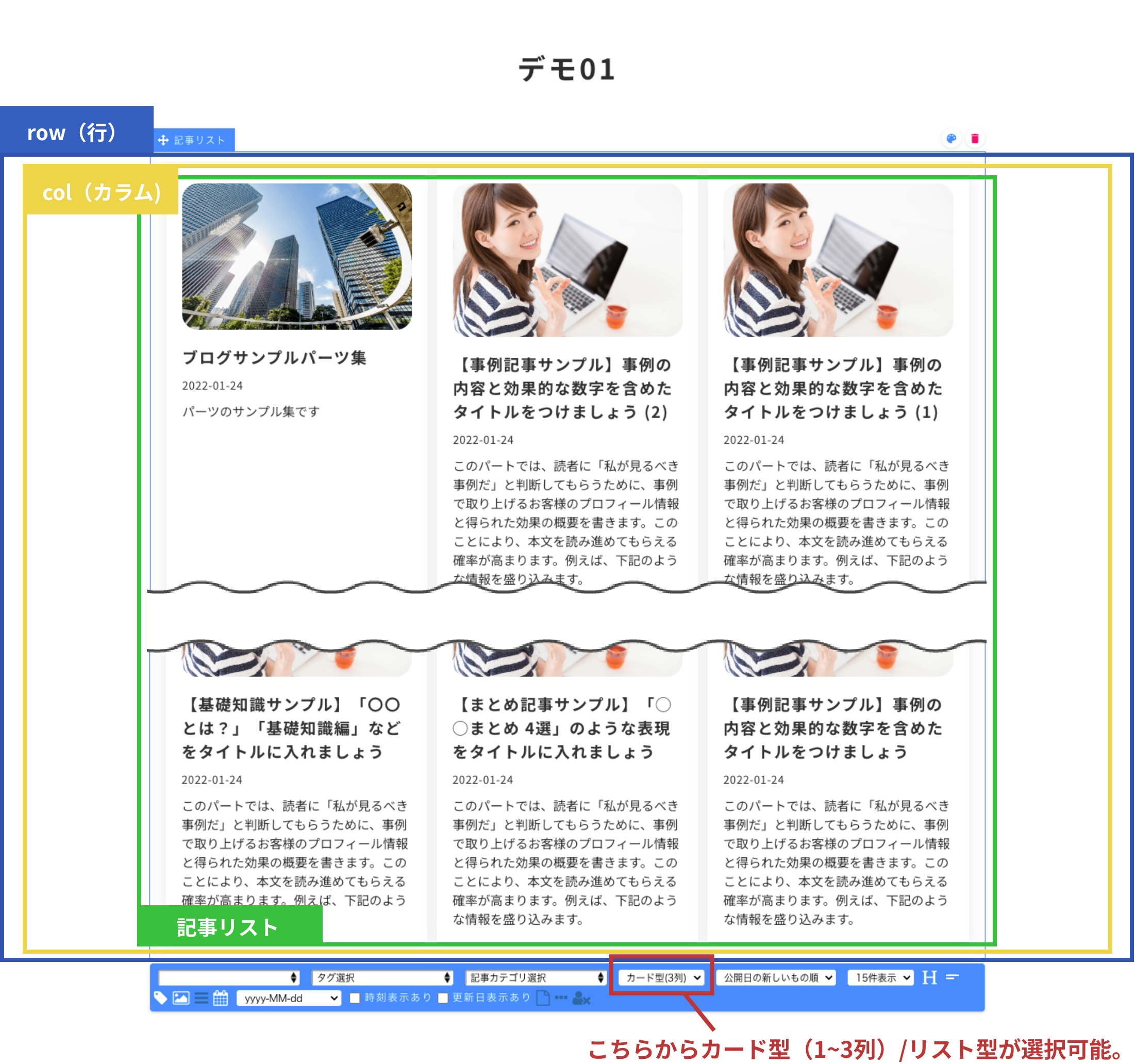
構造図
デモのパーツの構造を説明しています。
設定方法
- CSSをカスタムCSSに記述。
- 編集画面用CSSをカスタムCSSに記述。
- JavaScriptを使用したいパーツのセクションの一番下に配置。複数ページ設置する場合は共通フッターに配置。
- パーツとクラス名をデモに合わせて設置する。
- 記事リストパーツにクラス名「swiper」を追加。
※必要に応じて、記事リストカスタム用のクラス名「caseContent_style」を追加。
-
新CMSの場合:基本デザインパーツ(セクションパーツ、複合パーツ、単体パーツ)を使用して問題ありません。
注意点
- 【カード1型・2型・4型/リスト型】や【画像+テキストのスライダー】と併用できません。
カスタムCSS
2023-07-21更新
/*----- 記事リストスライダー START -----*/
.theme-fo-base .wrapper .contents {
:is(section,section[data-designpart-id]:not(:root):not(:root):not(:root):not(:root)) {
.inner {
.row {
.col {
.component {
&.entry-list {
// スワイパー
&.swiper {
visibility: hidden;//ちらつき防止
height: 0;//記事リスト数分の高さが出るのを阻止
margin-bottom: 35px;
padding: 20px;//シャドウが隠れる対策
@include breakpoint-sp {
margin-bottom: 55px;
}
@include breakpoint-ssp {
padding: 20px 10px;
}
.article-list {
&.swiper-wrapper {
flex-wrap: nowrap !important;
gap: 0;
.entry-list-unit {
height: initial;
margin-right: 20px !important;
}
}
}
}
}
}
// アローボタン
:is(.swiper-button-next, .swiper-button-prev) {
width: 70px;
height: 70px;
background: #ffad2f;
border-radius: 50vh;
opacity: $hover_opacity;
@include breakpoint-ssp {
width: 50px;
height: 50px;
}
&:hover {
opacity: 1;
}
&::after {
font-size: 20px;
color: #fff;
}
}
// 前へボタン
.swiper-button-prev {
left: -20px;
@include breakpoint-ssp {
left: -15px;
}
}
// 次へボタン
.swiper-button-next {
right: -20px;
@include breakpoint-ssp {
right: -15px;
}
}
// ページネーション
:is(
.swiper-horizontal > .swiper-pagination-bullets,
.swiper-pagination-bullets.swiper-pagination-horizontal,
.swiper-pagination-custom,
.swiper-pagination-fraction
) {
@include breakpoint-sp {
bottom: -20px;
}
.swiper-pagination-bullet {
width: 10px;
height: 10px;
background: #ffad2f;
margin: 0 5px;
}
}
}
}
}
}
}
/*----- 記事リストスライダー END -----*/
編集画面用カスタムCSS
2023-07-21更新
/*-- 記事リストスライダー 編集画面用 START --*/
@include edit-page {
.theme-fo-base .wrapper .contents {
:is(section,section[data-designpart-id]:not(:root):not(:root):not(:root):not(:root)) {
.inner {
.row {
.col {
.component {
&.entry-list {
// スワイパー
&.swiper {
visibility: visible;
height: initial;
}
}
}
}
}
}
}
}
}
/*-- 記事リストスライダー 編集画面用 END --*/
JavaScript
2022-08-22更新
<script
src="https://code.jquery.com/jquery-3.6.0.min.js"
integrity="sha256-/xUj+3OJU5yExlq6GSYGSHk7tPXikynS7ogEvDej/m4="
crossorigin="anonymous"
></script>
<link rel="stylesheet" href="https://cdn.jsdelivr.net/npm/swiper@8/swiper-bundle.min.css" />
<script src="https://cdn.jsdelivr.net/npm/swiper@8/swiper-bundle.min.js"></script>
<script>
'use strict';
/*--- jQueryコンフリクト回避 ---*/
jQuery.noConflict();
/* ---------------------------
記事リストスライダー
--------------------------- */
jQuery(function () {
/* 1秒後に実行 */
setTimeout(function () {
/*------------- 変数定義 【変更可能】 START -------------*/
const swiperList = jQuery('.swiper');/* スワイパー */
swiperList.closest('.col').css('position', 'relative'); /* アローアイコンを内側に入れるために指定 */
const swiperRow = swiperList.closest('.row');/* スワイパーが入ったrow */
/*------------- 変数定義 【変更可能】 END -------------*/
for (let i = 0; i < swiperRow.length; i++) {
const index = i + 1;
const targetSlideSwiper = swiperRow.eq(i).find('.swiper');/* 各スワイパー要素を取得 */
const targetSlide = swiperRow.eq(i).find('.swiper .entry-list-unit');/* 各スワイパー内の記事リストを取得 */
/* ページネーションとアローボタン */
const swiperPaginationEl = jQuery(
`<div class="swiper-pagination swiper-pagination-${index}"></div>` +
`<div class="swiper-button-prev swiper-button-prev-${index}"></div>` +
`<div class="swiper-button-next swiper-button-next-${index}"></div>`
);
/* 各スワイパーのクラス名にindex付与(複数設置対応) */
const swiperWrapper = jQuery('.swiper .article-list');
swiperWrapper.addClass('swiper-wrapper');
targetSlide.addClass('swiper-slide');
targetSlideSwiper.addClass(`swiper-${index}`);
swiperPaginationEl.insertAfter(`.swiper-${index}`);
const swiper = new Swiper(`.swiper-${index}`, {
slidesPerView: 1, /* 一画面に表示する枚数 */
loop: true, /* ループさせる */
spaceBetween: 20, /* 記事リスト間の余白 */
centeredSlides: true, /* 中央寄せ */
/* ページネーション */
pagination: {
el: `.swiper-pagination-${index}`,
clickable: true, /* クリック可にする */
},
/* アローボタン */
navigation: {
nextEl: `.swiper-button-next-${index}`,
prevEl: `.swiper-button-prev-${index}`
},
breakpoints: {
/* 576px~768pxの場合 */
576: {
slidesPerView: 2, /* 一画面に表示する枚数 */
},
/* 768px以上の場合 */
769: {
slidesPerView: 3, /* 一画面に表示する枚数 */
}
},
});
}
swiperList.css('visibility', 'visible');/* ちらつき防止 */
swiperList.css('height', 'initial');/* 記事リスト数分の高さが出るのを阻止 */
/* 記事リスト画像を取得(loading="lazy"外し) */
jQuery('.swiper-slide img').removeAttr('loading');
}, 1000);
});
/* ---------------------------
記事リストスライダー END
--------------------------- */
</script>

© Basic Inc. All Rights Reserved.